Arch-based · Wayland · local-first AI
SynapseOS
Where the kernel thinks.
An Arch-based Linux distribution with a local large language model wired into the system layer — not bolted on top. The shell, the compositor, the security monitor and a kernel module all talk to one inference daemon over a Unix socket. No network calls. No API keys. The model lives on your machine.
Download 1.0.1 Source on GitHub
Fifteen themes ship. Try one on this page.
Status: 1.0. A real, actively developed system — the author daily-drives it, and it is ready for you to do the same. It is a rolling release: an installed machine keeps taking updates through syn-update.
No API key, no request, no round trip. synsh is
a normal POSIX-ish shell until you stop typing commands; describe the outcome
instead and it asks the model already resident in synapd, on your
own machine — then shows you the command instead of running it.
What is SynapseOS?
Most “AI operating systems” are a chat window on a normal desktop.
SynapseOS starts one layer down. A local inference daemon called
synapd owns the model and serves every other component over the SYN
socket protocol, so the AI is a system service in the same sense that
systemd-resolved is — something the rest of the OS can depend on
rather than an app you open.
The desktop is synui, a wlroots Wayland compositor written for this
system rather than adapted to it — one that knows the AI daemon exists and
holds a live subscription to the security monitor’s verdict feed.
-
Local inference, no accounts
The installer downloads one model — Mistral 7B Instruct (Q4_K_M, ~4.1 GB) is the recommendation, and you can decline — and runs it through llama.cpp. Nothing to configure afterwards, and nothing leaves the machine.
-
An assistant with the run of the desktop
vibeis a chat window and a terminal command in one — it opens folders and panels, changes settings and applies them live, reads and edits files, and runs commands you confirm. Plain requests never reach a model at all. It uses the resident model by default, or Claude or OpenAI with a key. -
A shell that takes English
synshis a normal POSIX-ish shell until you stop typing commands. Describe the outcome instead and it resolves the intent against the local model — then shows you what it is about to run. -
A compositor of its own
synuiruns on wlroots 0.20 and renders through scenefx 0.5: tiling and monocle layouts, XWayland, layer-shell, glass, blur, shadows, and an optional CRT post-process pass. Workspaces are shared across monitors or one set per monitor, switching flat or as a turning cube, and a display that can take HDR10 can be driven in it. -
Security that enforces in-kernel
synguardclassifies syscall events, scores threats and publishes verdicts on a feed the desktop subscribes to. Since 0.2.4 it can also deny in-kernel through a BPF-LSM gate, behind warmup, heartbeat and deny-budget guards. -
Telemetry from a real kernel module
synapse_kmodis a DKMS module exporting syscall telemetry and AI scheduling hints through/sys/kernel/synapse/—syscall_log,ai_hints,stats,status,config,version. -
A terminal that links no GL
synttyis the default terminal: wl_shm, xdg-shell, xkbcommon and libc, cells to pixels on the CPU. 359 KB, a window in 5.8 ms, tabs, images, and OSC 133 prompt marks thatsynshemits at the other end. A live image cannot count on a GL context. -
Applications of its own
A file manager (
synfiles), a package manager (synpkg), settings (syn-settings), an editor (syn-edit), a disk utility (syn-disks), a calendar (syn-cal), a media player (syn-play), a locked folder (syn-vault) and a disk cleaner (syn-clean) — each written for this system, and each a window and a command line over one binary rather than two programs that disagree. -
Fourteen languages, everywhere
English, German, French, Spanish, Portuguese, Italian, Dutch, Polish, Russian, Japanese, Chinese, Korean, Hindi and Arabic — in the installer and in every application on the system, not the installer alone. The compositor shapes its own text through HarfBuzz and FriBidi, so Arabic joins and reads right to left. The language is the first question the image asks, from the boot menu, and nothing asks again.
-
A ten-foot interface
Big screen mode (Super+F10, or the pad’s Guide button) puts the Steam library, Big Picture, a browser, music, and any Plex or Jellyfin server on the network on a television — drivable from a controller, including as a mouse.
-
An installer that respects your disk
syn-installoffers a whole-disk install with optional LUKS2 full-disk encryption, or — on UEFI, where the disk already holds another OS — a non-destructive dual-boot into existing free space, reusing the machine’s ESP. Four filesystems, three bootloaders.
How it fits together
One model, resident once, shared by everything. Components do not each load
their own copy — the desktop assistant reuses the model already sitting in
synapd rather than spending a second allocation of VRAM.
  User
   │
   ▼
 synsh ─── natural language / commands ──┐
   │                                     │
   ▼                                     │
 synapd  (local LLM — Mistral 7B)        │
   │  inference over SYN socket protocol │
   ├──► synguard      security verdicts ─┤
   ├──► synnet        network policy     │
   └──► synapse_kmod  kernel sysfs       │
            │                            ▼
            ▼                    synui (Wayland)
     /sys/kernel/synapse/
     syscall_log, ai_hints, stats,
     status, config, version
The desktop
synui draws its own display settings, wallpaper picker, dock, cursor
picker, sound panel and control panel. The status bar and the desktop widgets are
a native quickshell shell.
Everything below is compositor-drawn — there is no third-party panel or
settings app in the picture.
A fresh install boots into SYNAPSE Prism, and Prism has no colour of its own: it is one dark, near-neutral surface at low alpha, and the wallpaper supplies the colour through it — measured live, on every wallpaper change, and carried to the bar, the dock, the icons and, if there is anything in the machine that glows, to the RGB hardware as well. Fifteen themes ship, Prism Light among them; one slider sets how much of the desktop you see through.
The bar takes third-party widgets in
Omarchy’s
shell-plugin format. Their desktop is a quickshell process and so is this bar,
which makes their format the only one already describing “a QML widget you
can drop into a quickshell bar” — so a widget written once loads on
either. synui-plugins browse lists what you can install, and there is
a terminal browser and a window for it too.


Super+E: scanlines,
curvature, chromatic aberration and an amber phosphor, applied by the
compositor to everything on screen at once.
Some of what the keyboard reaches
| Key | Action |
|---|---|
| Super (tapped alone) | Start menu |
| Super+C | Control panel — every setting and shortcut in one place |
| Super+/ | Shortcut palette — every binding, searchable; F2 on a row moves it |
| Super+Return | Open a terminal (syntty) |
| Super+Space | Command bar — synsh intents and output capture |
| Super+= | App launcher |
| Super+Backspace | Ask the AI |
| Super+A | Neural activity overlay |
| Super+W | Wallpaper picker (per-monitor with Tab) |
| Super+E | Visual effects — CRT strengths, corners, shadow, blur |
| Super+T | Theme manager — fifteen of them, and the switcher at the top of this page is seven |
| Alt+Tab | Mission control — every window on this desktop at once, and the desktops along the bottom |
| Ctrl+Alt+Delete | Task manager (CPU / RAM / GPU) |
| Super+G | Game mode |
| Super+F10 | Big screen mode — the ten-foot interface for a television |
The full table — sixty-odd bindings — is in the README, and Super+C generates it live from the running bind table.
A look around
Every window below is part of SynapseOS. The file manager, the package manager, the settings, the disk utility, the task manager and the editor are all written for this system — there is no third-party desktop suite underneath.
-

Control panelEvery setting the compositor owns, on one keystroke. Generated from the live bind table, so it cannot drift from what the keys actually do. -

Softwaresynpkg — a libalpm front end in C, with the curated SynapseOS list beside the AUR and Flathub. -

Filessynfiles, with the capacity of every device in the sidebar and tabs across the top. -

SettingsWhat the kernel sees for each connector, beside what the compositor is actually driving. The two disagreeing is a bug you can now see. -
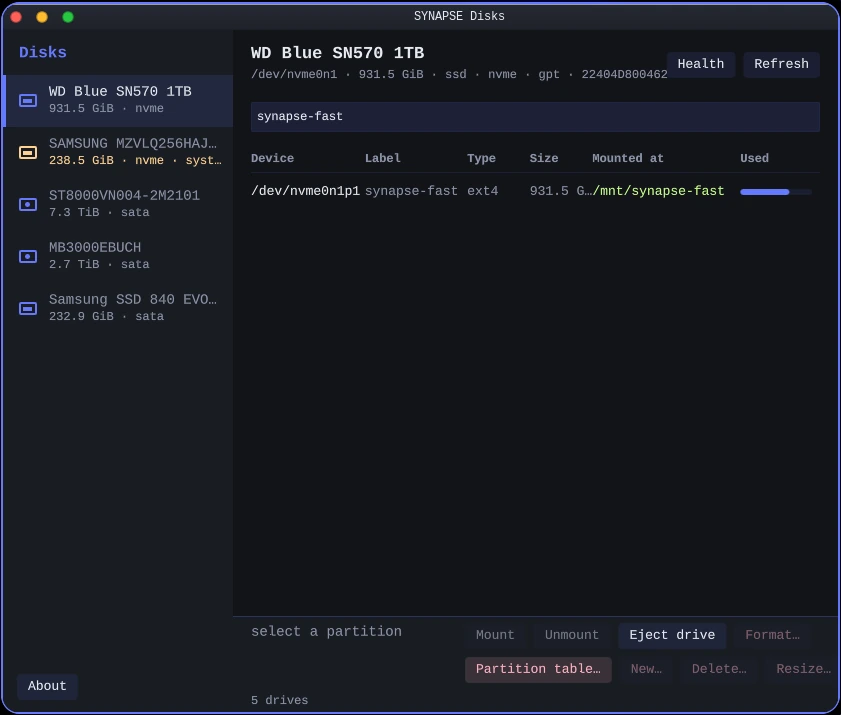
DisksPartitions, health and mount state. The disk the system booted from cannot be formatted, and the refusal says so. -

Task managerCPU, memory, GPU and VRAM, per process — on Ctrl+Alt+Delete. -

ArcadeMangoHud, controller mapping, per-game window fit and the shortcuts that drive them. -
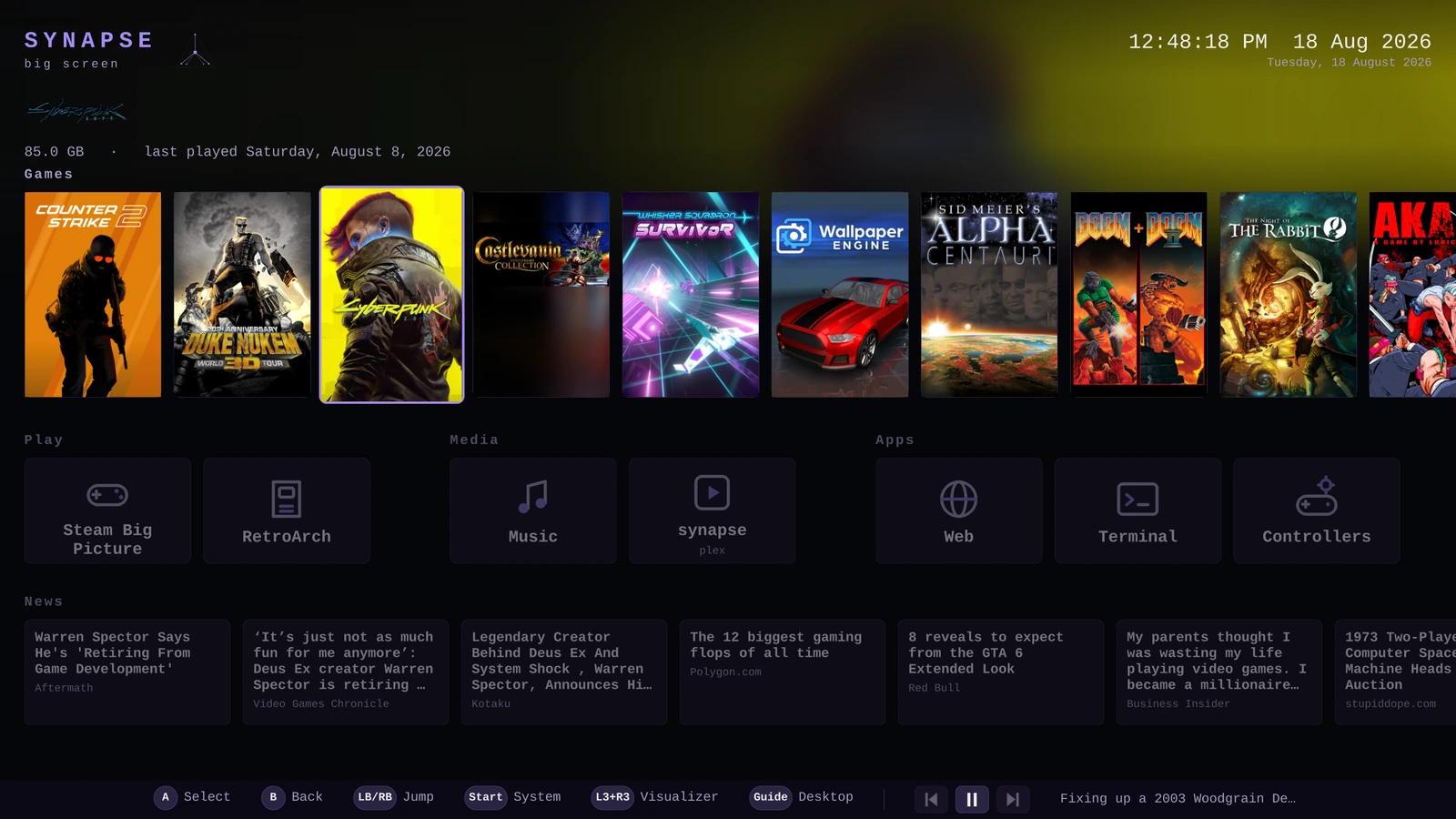
Big screenThe ten-foot interface: the Steam library, media and the machine's own switches as tiles, driven with a controller. -
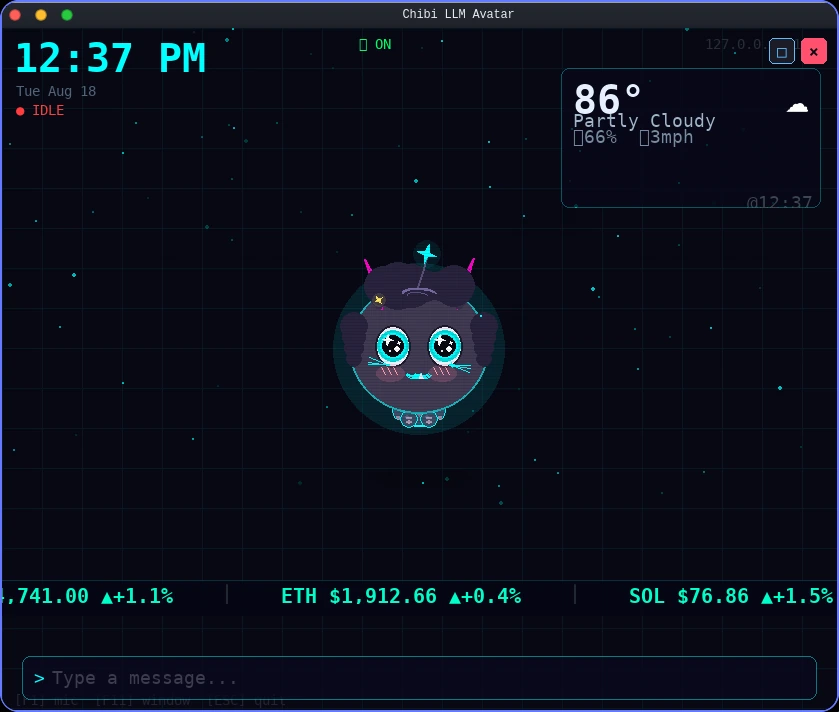
ChibiA local-LLM avatar that also carries the clock, the weather and the tickers. -

ArsenalFive thousand BlackArch tools, by category, installed on demand rather than shipped. -

UpdatesSource-revision aware: it names what an ISO upgrade would bring that a package update cannot. -
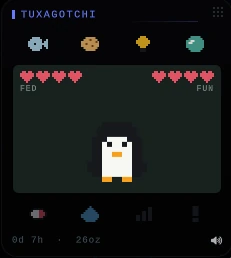
TuxagotchiA desktop widget that needs feeding. The desktop takes widgets; this is one of them. -

Fifteen themesThe same window across four of them. Every application on the system reads the palette, not just the bar.
Components
Each lives in its own directory in the tree with its own PKGBUILD.
Twenty-two of them are also published separately, each from its
own repository under github.com/velle999
— so the desktop, the terminal, the applications and the AI stack build and
install on a plain Arch machine that has never seen this ISO.
| Component | What it does |
|---|---|
synapd | Local LLM inference daemon (llama.cpp). Owns the model; serves every other component over a Unix socket. Drops root after start. |
synsh | AI-native shell. Type naturally, or use it as a normal shell. |
synui | Wayland compositor on wlroots 0.20, rendering through scenefx 0.5 — tiling and monocle layouts, per-output workspaces, XWayland, layer-shell, glass, blur, shadows. |
synguard | Security monitor. Classifies syscall events, scores threats, publishes verdicts on a feed synui subscribes to; optional in-kernel BPF-LSM enforcement. |
synnet | Network policy daemon with nftables integration. |
synapse_kmod | Kernel module (DKMS). Syscall monitoring and AI scheduling hints, exposed via sysfs. |
syntty | The terminal, and the default one. A Wayland terminal that links no GL at all — 359 KB, a window in 5.8 ms, tabs, the alternate screen, images, and OSC 133 prompt marks. |
synpkg | The package manager. One C binary over libalpm covering the Arch repositories, the AUR, Flathub, BlackArch and SynapseOS’s own components — CLI, terminal browser and GUI over the same code. |
synstudio | The darkroom and the cutting room. One colour engine decides a pixel for both, so a photograph and a frame of the same footage graded the same way come out the same — a clip’s grade is baked to a 3D LUT and handed to ffmpeg. Non-destructive: edits live in a sidecar and the original is never written. |
synfiles | The file manager, and what a folder opens in. Trash, undo, split view, thumbnails, archives and search, with a window, a terminal browser and a command line as three front-ends onto one binary. |
syn-settings | Settings. Displays, keyboard and language, date and time, network, Bluetooth, power, kernels, default applications, what starts at login, and the accounts on the machine — every pane reading the real source, and saying which file decided it. |
syn-edit | The text editor. One modal engine driving a terminal editor, a graphical window, and a scripting mode with no terminal at all. |
syn-cal | The calendar and schedule planner. CalDAV, Google Calendar and Microsoft 365 over Graph, with a window, a terminal view and a command line over one sync engine. Your appointments are a folder of .ics files — the vdir layout, not a private database. |
syn-play | The media player. Playlists, shuffle, quick open and history over mpv, which already decodes everything — every feature asked mpv first. |
syn-vault | A folder with a password. ~/Vaults/<name> while it is open, encrypted at rest through gocryptfs, closed when you say so — and a Vault row in synfiles’ sidebar. It contains no cryptography of its own, deliberately. |
syn-clean | Disk cleanup and secure delete. Ten categories measured and removed, and a shred that destroys a file or folder on purpose — both also right-click entries in synfiles. |
syn-disks | The disk utility. Drives, health, mounting, safe removal, formatting and partitioning — and it refuses to format anything sharing a disk with a running system, with no override. |
syn-arcade | The game assistant: the MangoHud overlay inside a running game, controllers outside Steam, SDL mapping overrides, and big screen mode for a television. |
syn-confine | A sandbox launcher — run a command inside a kernel-enforced allowlist (Landlock), inherited across execve. |
syn-arsenal | The BlackArch browser — ~5000 security tools by category, installable from a window or a terminal. |
vibe | The desktop assistant — a chat window and a terminal REPL over the resident model, or Claude/OpenAI with a key. Opens folders, panels and applications, changes settings, reads and edits files, and runs shell commands in syn-confine’s sandbox. Anything that writes asks first; it speaks and takes dictation, and answers to its name. |
chibi | Voice-interactive AI companion with a security-sentinel aspect over synguard’s verdict feed. |
syn-update | Updates the SynapseOS half of an installed system, rebuilding only the components whose version moved. |
Download SynapseOS
Latest release: 1.0.1 — signed and verified updates, a firewall that asks about each network, and a malware scanner that says what it found. Free, x86_64, about 4.6 GiB. The model is downloaded during installation, not carried in the image.
Download the ISO — 4.6 GiB Mirror Torrent
One file, resumable, nothing to reassemble. The mirror is the Internet Archive, which carries the same image and the torrent for it.
Check your download
A 4.6 GiB download that stops early still looks like an ISO and still writes to a stick. The checksum is what tells you it arrived whole.
Linux / macOS
curl -O https://dl.soslinux.org/SynapseOS-1.0.1-x86_64.iso.sha256
sha256sum -c SynapseOS-1.0.1-x86_64.iso.sha256   # shasum -a 256 -c on macOS
Windows
In PowerShell, in the folder you downloaded to:
(Get-FileHash -Algorithm SHA256 .\SynapseOS-1.0.1-x86_64.iso).Hash -eq `
  (((Get-Content .\SynapseOS-1.0.1-x86_64.iso.sha256) -split '\s+')[0]).ToUpper()
True means the download is intact. Get-FileHash prints
uppercase hex where sha256sum writes lowercase — same bytes,
hence the .ToUpper(). In Command Prompt instead:
certutil -hashfile SynapseOS-1.0.1-x86_64.iso SHA256, and compare
it against the .sha256 file yourself.
Or download it in parts, from GitHub
GitHub caps a release asset at 2 GiB, so the copy attached to the
release page
is split — three parts for 1.0.1. The download above is
the same image in one piece; this path exists for anyone who would rather
take it from GitHub. Download all the .part*
files plus the .sha256, into one folder. Joining them is a plain
byte-for-byte concatenation; the checksum is what tells you it worked.
Linux / macOS
cat SynapseOS-1.0.1-x86_64.iso.part* > SynapseOS-1.0.1-x86_64.iso
sha256sum -c SynapseOS-1.0.1-x86_64.iso.sha256   # shasum -a 256 -c on macOS
Windows
In Command Prompt, in the folder you downloaded to:
copy /b SynapseOS-1.0.1-x86_64.iso.part00 + SynapseOS-1.0.1-x86_64.iso.part01 + SynapseOS-1.0.1-x86_64.iso.part02 SynapseOS-1.0.1-x86_64.iso
certutil -hashfile SynapseOS-1.0.1-x86_64.iso SHA256
Name every part, in order, joined by +. /b is
not optional: without it copy runs in text mode and stops
at the first 0x1A byte — a few hundred KB into the image
— leaving a short file, no error message, and a stick that will not boot.
Check who built it
The checksum above proves your download arrived whole. It does not prove where the image came from: it is served from the same place as the ISO, so anything that could alter one could alter the other. The signature is the part that answers that.
A signature is only worth your confidence that the key behind it is the
right key. This one’s fingerprint is also committed in the source
repository, as
archiso/release-key.fingerprint
— a different host, run by somebody else, than the one that served you
the image. Compare all three: what gpg prints, what is on this
page, and what is in the repository.
Releases from 0.2.9.5 onward carry a
.asc signature. Earlier ones, including 0.2.9.4, do not
— there is nothing to check on those.
Linux / macOS
curl -O https://soslinux.org/synapseos-release-key.asc
gpg --import synapseos-release-key.asc

gpg --verify SynapseOS-1.0.1-x86_64.iso.asc SynapseOS-1.0.1-x86_64.iso
A good signature prints Good signature from "SynapseOS Release
Signing". Check the fingerprint it names against this one:
6548 9EF5 C20D 0BD9 4211 472B ED33 6DB7 952B 609E
gpg will also say the key is not certified with a trusted
signature. That is expected and is not a failure: it means you have not
told GnuPG you trust this key, only that the signature matches it. Comparing
the fingerprint above is what closes that gap.
Windows
With Gpg4win installed, the same three commands work in PowerShell. Without it, the SHA256 check above is still worth doing on its own.
Write it to a USB stick
Writing a stick erases it. Everything already on it is gone.
Linux / macOS
sudo dd if=SynapseOS-1.0.1-x86_64.iso of=/dev/sdX bs=4M status=progress oflag=sync
Check /dev/sdX with lsblk first, and write to the
disk (/dev/sdb), not to a partition on it
(/dev/sdb1).
Windows
- Rufus — pick the ISO, press START, and choose DD Image mode when it asks. This is a hybrid image; ISO mode rebuilds boot files it has no reason to get right.
- balenaEtcher — nothing to configure.
- Ventoy
— copy the
.isoonto a stick that already has Ventoy on it and pick it from the boot menu. The one option here that erases nothing.
Then boot the stick from your firmware’s boot menu — usually
F12, F11, Esc or Del at
power-on. Secure Boot has to be off, or SynapseOS enrolled; see
Secure Boot.
Or try it in a VM first
git clone https://github.com/velle999/SYNAPSE.git && cd SYNAPSE
QEMU_RAM=8G ./archiso/build_scripts/qemu-test.sh
The script auto-detects the newest ISO, uses KVM when available, boots UEFI via OVMF, and attaches a persistent 20 GB test disk.
System requirements
- CPU — x86_64. CPU inference is the default and works everywhere.
- RAM — 8 GB minimum; a resident 7B model is the reason.
- Disk — ~25 GB for an install, plus room for the model.
- Network — needed once, during installation, to fetch the model.
- GPU — optional. NVIDIA via a CUDA build, AMD and Intel via Vulkan.
- Firmware — UEFI or BIOS. Dual-boot installs need UEFI.
Frequently asked questions
Does SynapseOS send anything to the cloud?
No. The installer downloads a model once; after that the file lives on the machine and inference runs locally through llama.cpp. There are no API keys to configure and no account to create, and the AI works with the network cable out.
Is it just Arch with an app on top?
No. The inference daemon is a system service and the components query it over a socket: the shell resolves intent through it, the compositor talks to it, the security monitor uses it to classify events. The desktop, the shell, the security monitor, the network daemon and the kernel module are all written for this project.
Can I run it on a machine with no GPU?
Yes — that is the default. The ISO ships a CPU build of the inference backend so it starts on any x86_64 machine. GPU acceleration is a separate package you install afterwards if you have the hardware.
Is it free and open source?
Yes. SynapseOS-authored code is GPL-2.0-or-later, except the kernel module, which is GPL-2.0-only because the Linux kernel is. The whole tree is on GitHub.
Can I use it as my daily driver?
Yes. The author does, and at 1.0 it is ready for you to do the same. It is a rolling release, so it keeps moving after you install it, and a VM is still the quickest way to look around first.
How do updates work?
An installed system needs two commands, because they cover different halves of
it: sudo pacman -Syu for Arch, and syn-update check /
syn-update apply for the SynapseOS components. There is a GUI for the
second one in the start menu.
Merch
Two mugs, a sticker and a lamp. They are printed and shipped by Printify, which also takes the payment — this site sells nothing and stores nothing about you. Buying one is not how the project gets funded; it exists because people asked for a mug.
-
 SynapseOS Logo Ceramic Mug
$12.40
SynapseOS Logo Ceramic Mug
$12.40
-
 Custom UV Acrylic Night Light
from $13.72
Custom UV Acrylic Night Light
from $13.72
-
 SynapseOS Purple Logo Vinyl Sticker
from $4.09
SynapseOS Purple Logo Vinyl Sticker
from $4.09
-
 SynapseOS Glass Mug, 10 oz
$26.10
SynapseOS Glass Mug, 10 oz
$26.10
There is more in the store than the four above — a t‑shirt, a hoodie, a trucker hat, kiss‑cut stickers and a pair of socks, all carrying the same mark.
Prices are copied here for convenience and can drift — the store is the one that is right. Anything with sizes shows its cheapest.
Get involved
The wiki is the operator’s manual — installing, updating, every keybinding and config key, the release process, and a catalogue of the failure modes we have already hit. Issues, discussion and the full source tree live on GitHub.